
3D Performance Simulator Instructions

With interactive marching simulation, the 3D Performance Simulator allows any single performer of any drill design to physically mark time and step off the entire marching show with all correct direction changes. You will also be evaluated and scored on three things:

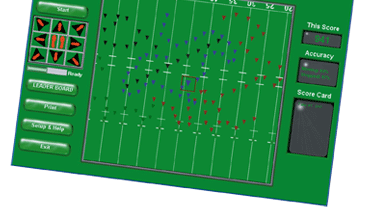

Here's what you have to do:
-
Perform in tempo. Every beat you tap with the sound of the music must be very close to the beat to get credit for a footfall. There is a little bit of fudging allowed.
 You can be within one tenth of a second before the beat and one tenth of a second before the next beat to get credit for a footfall. The Performance Simulator also scores on half time and double time moves and a hold in the music will require you to halt for correct scoring.
 - Make accurate direction of travel changes. Now this is tricky at first, but after you try it a few times, you'll get the hang of it.
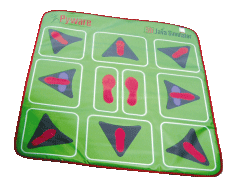
With the Pyware March Pad we use the "step out" or "step off" rehearsal method. Keep time in the center of the pad by marking time with your feet together. With each new drill move or direction change take the first step in the new direction with the correct foot, then return that foot to the center to maintain tempo by marking time.
Mark time - The sensor is in the heels of the feet. Whether your mark time style is with toes on the ground or picking the toes up, it is always the heel hitting the ground that establishes the beat.
Move Left, Right, Forward, Back, or diagonal for 16 counts - let's assume all your step offs of drill moves will be with the left foot. Place the left foot (heel or toe, which ever is appropriate for the direction) in the square that indicates the desired direction on beat one. On beat two, place the right heel down in the marking time fashion to maintain the appropriate tempo. On beat three, the left foot returns to the center placing the heel down to continue marking time for the remainder of the 16 counts.
Hit all beats in time (marking time) with correct feet and hit all direction changes correctly, and you have just scored a perfect 1,000 points!
It's that easy...or is it??? Good Luck and Have Fun!
Helpful Hints and Interesting Pointers
- Timing the tricky start - Hit the start button: listen for the music. If the first of the show is halt or mark time, then you have some sound to help establish a tempo. If the drill show starts immediately with movement and no sound to cue your entrance, just memorize how little time before stepping off after hitting the start button. Drill designers are encouraged to synchronize sound files with an intro click track to assist the performers.

For support email us at PywareTechSupport@pyware.com, or call (940) 240-8536 between the hours of 9AM and 5PM Central Time.
You can also complete the feedback form and we will respond as soon as possible.